Gear & care
Where a wireless thermometer can lose its connection
On this page · 5 sections
Straight answer
Map every link from the probe to the display you will actually watch. MEATER Pro uses a Bluetooth repeater charger; RFX separates its probe radio from its Gateway’s network or local-phone connection; Smoke X4 sends a cabled-probe base’s readings to a dedicated receiver. A range number for one hop is not a coverage guarantee for the complete path. [1] [4] [6] [9] [11]
Start with the complete path
Wireless may describe a food probe, a base-to-receiver hop or a way to put readings in an app. Those architectures create different failure points. Draw the components you own before deciding that the problem is Bluetooth, Wi-Fi or range. [1] [4] [9]
On a narrow screen, scroll the table sideways to compare all columns.
| System and viewing mode | Complete signal path | Dependencies and limits |
|---|---|---|
| MEATER Pro: local viewing | Probe to repeater charger by Bluetooth; charger to local phone/tablet by Bluetooth. [1] | Keep the charger as close as safely possible to the appliance; check the app/device permissions and each link separately. [1] [2] |
| MEATER Pro: Link extension | Repeater charger to a second Android/iOS device by Bluetooth; that bridge joins the viewing device through the same Wi-Fi network. [1] [3] | Both devices need the documented app setup, the same Wi-Fi network and sign-in to the same MEATER Cloud account. Keep the bridge within Bluetooth range. [3] |
| MEATER Pro: Cloud extension | The nearby Bluetooth bridge reaches Wi-Fi/internet and MEATER Cloud; the remote phone reaches the cook data over internet through Wi-Fi or cellular. [3] | Keep the bridge in Bluetooth range and follow the shared account/app setup. Remote internet cannot repair a failed local probe/charger/bridge link. [1] [3] |
| RFX: Wi-Fi/cloud viewing | RFX MEAT to RFX GATEWAY over 433 MHz RF; Gateway to the 2.4 GHz Wi-Fi router and internet/cloud; phone or web viewing through the cloud. [4] [6] | Initial setup uses phone Bluetooth for Wi-Fi credentials and a ThermoWorks Cloud account before adding MEAT; follow app/permission prerequisites and keep the Gateway antenna vertical. The 1,500 ft probe-hop specification is not Wi-Fi or remote-phone reach; Wi-Fi reach is router-dependent. [4] [5] [12] |
| RFX: local Bluetooth viewing | RFX MEAT to GATEWAY still uses 433 MHz RF; Gateway connects directly to a nearby phone using the documented Bluetooth mode. [4] [6] | This local viewing mode does not need Wi-Fi, and it does not inherit the first-hop range. Preserve initial setup/account prerequisites; distinguish viewing-mode Bluetooth from setup Bluetooth. [5] [6] [12] |
| Smoke X4: dedicated receiver | Food/air probe cable to Smoke X4 base; base to dedicated receiver by radio. [9] | No phone, home Wi-Fi or Wi-Fi add-on in this model’s path. The manual specifies receiver updates every 30 seconds while in range; its advertised range is unobstructed line of sight. [9] [10] [11] |
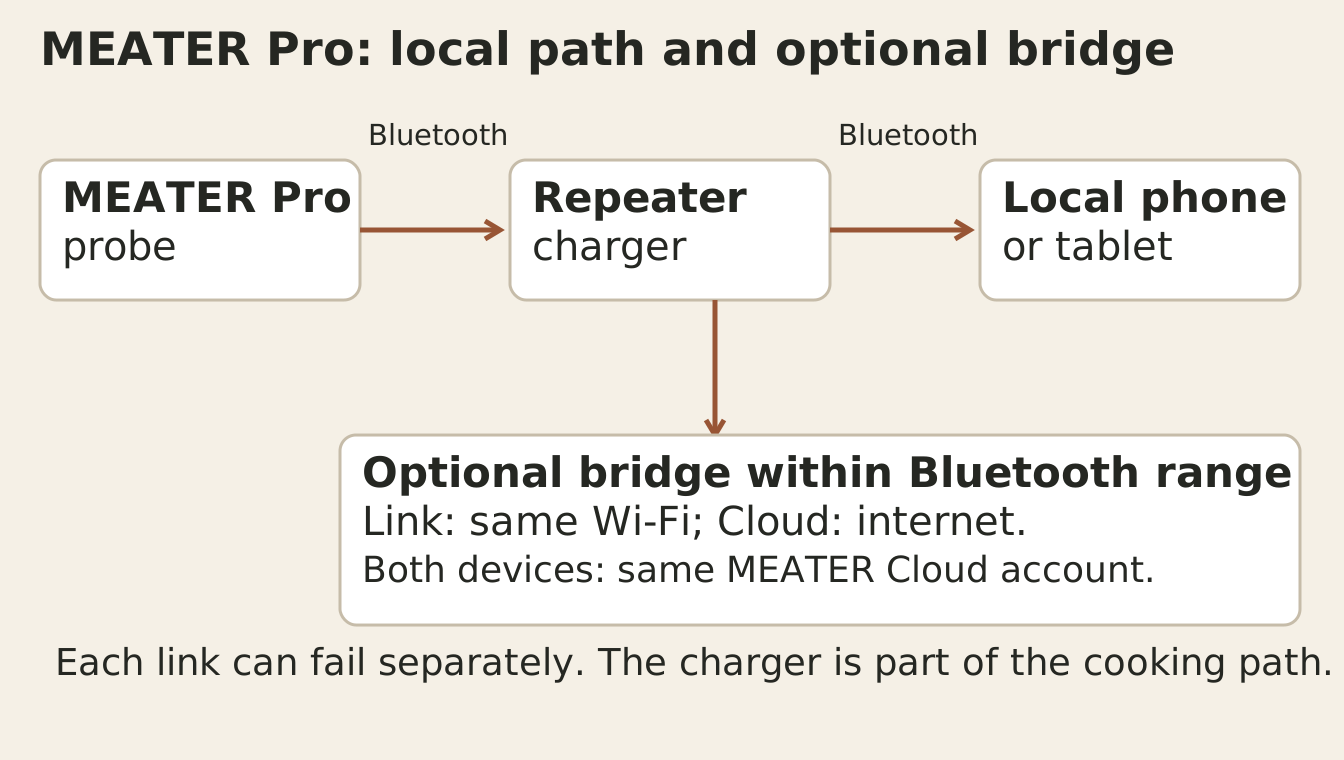
For the single-probe MEATER Pro, the charger is part of the signal path during a cook. Manufacturer guidance keeps it as close as safely possible to the appliance, because the cooker can affect the probe-to-charger link. Moving the watching phone closer addresses a different link from moving the charger. [1] [2]
MEATER Link and Cloud use a second Android or iOS device to bridge Bluetooth to Wi-Fi while it stays within Bluetooth range. For Link, install the app on both devices, sign both into the same MEATER Cloud account and connect both to the same Wi-Fi network; follow the documented app setup. Cloud viewing adds internet access on the remote device, but its cellular connection cannot replace a disconnected bridge beside the cooker. [3]
RFX: separate the probe hop from the viewing mode
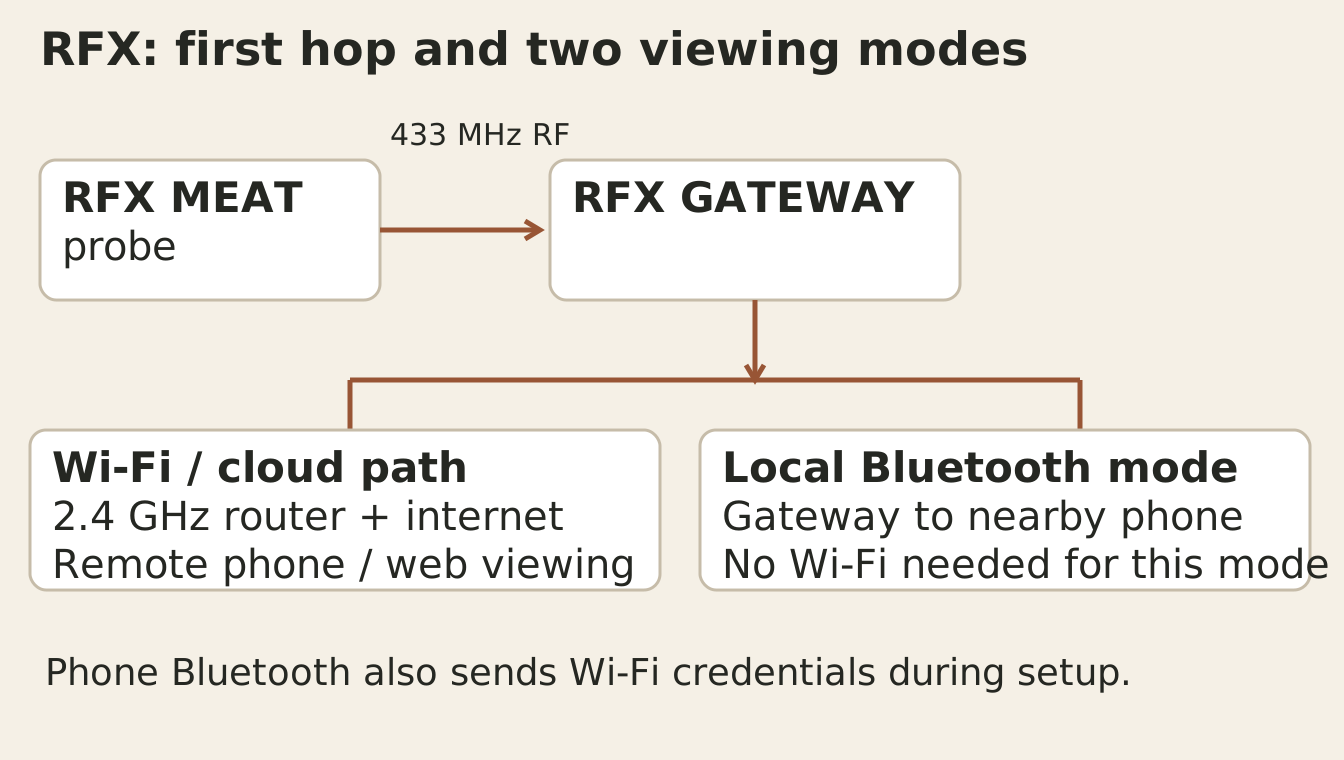
The instructions use your phone’s Bluetooth to send Wi-Fi credentials during setup, and specify a vertical Gateway antenna. Current support also documents local Gateway-to-phone Bluetooth operation without Wi-Fi. Those two Bluetooth uses do not change RFX MEAT’s separate RF link to its Gateway. [4] [5] [6]
Local viewing should not be read as erasing setup prerequisites. The documented initial path adds the Gateway to a ThermoWorks Cloud account before adding RFX MEAT and lists app, permissions and network requirements. Check the current setup instructions and installed software when planning an off-site cook. [12]
The Gateway specification assigns 1,500 ft to RFX MEAT-to-Gateway and describes Wi-Fi reach as router-dependent. It does not assign that range to the Gateway-to-phone Bluetooth connection. Test the actual viewing location and mode instead of carrying the first-hop number into every branch. [4] [6] [11]
Smoke X4: wireless receiver, cabled probes
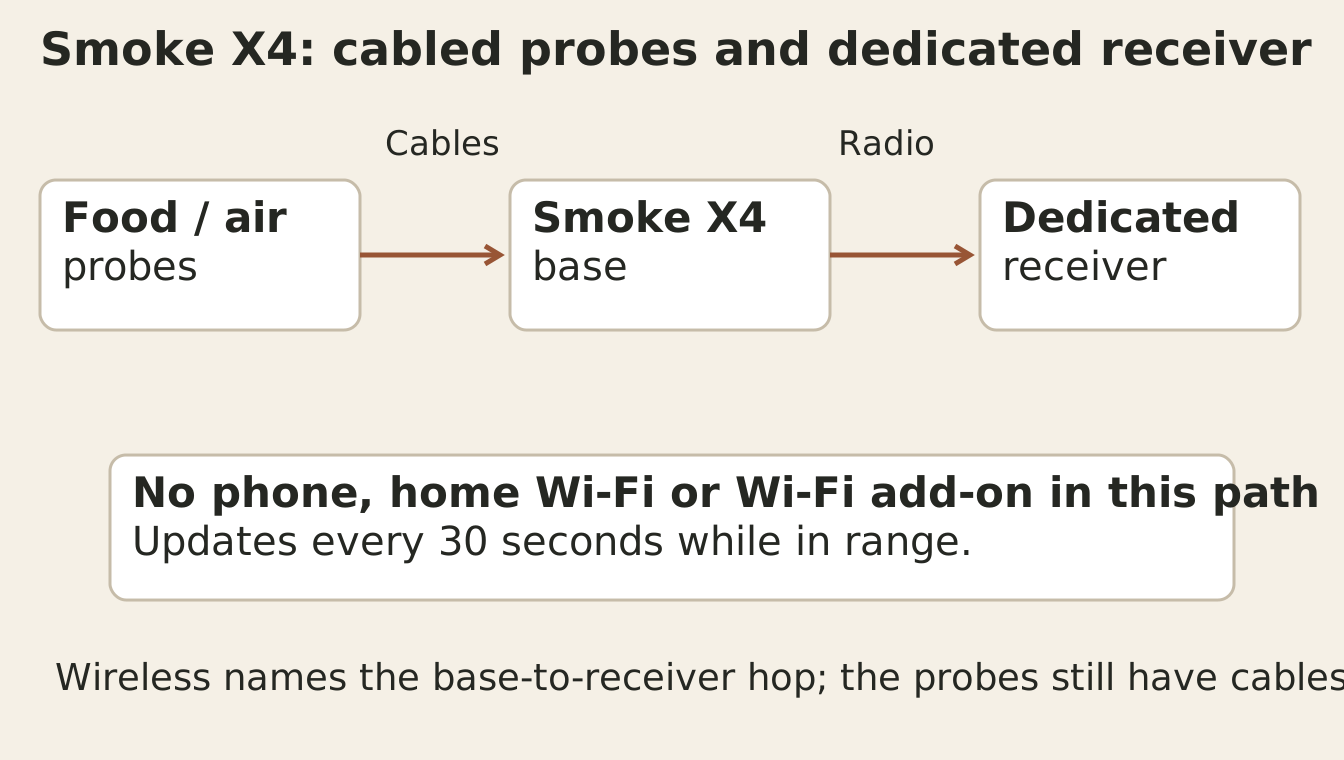
A dedicated receiver can remove the phone and router from this particular path. It does not remove the cable connection, the base, receiver power or the radio link. Smoke X4’s documentation is specific to Smoke X4; original Smoke with Smoke Gateway is a different system. [9] [10]
Diagnose the hop before changing the setup
On a narrow screen, scroll the table sideways to compare all columns.
| Observation | Link to investigate | Useful bounded check |
|---|---|---|
| MEATER Pro charger continually blinks green with undocked probe but app is disconnected. [1] | Charger to mobile device. | Check the supported app/device permissions and phone Bluetooth before blaming the probe-to-charger path. [1] |
| MEATER Pro charger goes red after ten seconds. [1] | Probe to charger. | Follow that model’s probe/charger troubleshooting; these LED meanings do not transfer to another charger. |
| RFX Wi-Fi returns but readings do not update immediately. [7] | Gateway/network/cloud data path. | Inspect connection status and data freshness; the help page describes reconnection delays, not a universal guaranteed stale-age limit. |
| RFX number is unchanged. [8] | Not enough evidence to assign a failed link. | Temperature-triggered transmissions can leave an unchanged value; inspect status and update information too. |
| Smoke X4 shows NO PROBE. [9] | Probe cable/plug/base input. | Check the documented plug/failed-probe path; moving the receiver does not reconnect a probe plug. |
Smoke X4’s manual advertises 6,562 ft / 1.24 miles under unobstructed line-of-sight conditions and says walls or obstacles reduce it. Manufacturer transmission guidance calls these range conditions best-case. Neither number promises coverage through your patio door, kitchen wall or upstairs room. [9] [11]
Check your actual cooking and watching locations
Keep entries blank until you make your own check. Record each hop and the viewing mode; do not treat this worksheet as an unattended-cooking guarantee.
These entries are personal notes. They are not sent to a restaurant or submitted to this site.
Sources and method
- MEATER Pro Device Compatibility and PermissionsSource checked · support.meater.com
- Range of MEATER ProSource checked · support.meater.com
- How to Use MEATER Link and CloudSource checked · support.meater.com
- ThermoWorks RFX GATEWAY product pageSource checked · www.thermoworks.com
- ThermoWorks RFX starter kit instructionsSource checked · www.thermoworks.com
- ThermoWorks RFX setup guide: current Bluetooth ModeSource checked · blog.thermoworks.com
- ThermoWorks Optimizing RFXSource checked · help.thermoworks.com
- ThermoWorks Unlock Maximum RFX Battery LifeSource checked · www.thermoworks.com
- ThermoWorks Smoke X4 Operating InstructionsSource checked · www.thermoworks.com
- ThermoWorks Signals vs Smoke X4Source checked · help.thermoworks.com
- ThermoWorks About Transmission Distance SpecificationsSource checked · help.thermoworks.com
- ThermoWorks Setup RFX GATEWAY and RFX MEATSource checked · help.thermoworks.com
How this article is prepared
Researched and drafted with AI assistance from the cited sources. Examples and calculations retain their stated assumptions; illustrations do not establish restaurant visits or equipment tests.
About BBQ Explorer