Gear & care
Why your smoker thermometer and probes show different temperatures
On this page · 4 sections
Straight answer
Label what each number represents before trying to make readings agree. A Woodridge setpoint is a target; its controller display and an independent air probe have different documented roles. MEATER’s exposed ambient sensor samples air near the food, while its Pro internal summary is the lowest of five internal sensor readings. Compare purpose, location and response before treating the difference as an accuracy failure. [1] [2] [4] [5] [6]
Give each display a measuring job
On a narrow screen, scroll the table sideways to compare all columns.
| Number you see | What it represents here | Useful comparison |
|---|---|---|
| Woodridge selected setpoint. [1] | The temperature target selected by the user. | Keep target and current display in separate log columns. |
| Woodridge controller current display. [1] [2] | A controller value; Traeger describes model-specific processing. | Follow that model’s diagnostics rather than assuming this equals any remote point in the chamber. |
| TX-1003X-AP clipped air probe. [4] | Air temperature at this independent probe’s position. | Record its position and follow its wall-clearance instruction. [8] |
| MEATER exposed ambient-end reading. [5] | Air directly outside the food, used with internal readings for cook-time estimation. | Do not use it as a requirement that the appliance has reached its setpoint. |
| MEATER Pro internal summary. [6] | Lowest of its five internal sensor readings. | Compare internal sensing positions; do not compare this meat reading with chamber air. |
A target, a controller display and an independent sample answer different questions. Traeger’s manual separates target selection from a current-temperature display; its support page describes model-specific scaling and averaging behavior. That explanation is attributed to the maker, not a test establishing that its number is always more accurate than another instrument. [1] [2]
Map the sensing positions
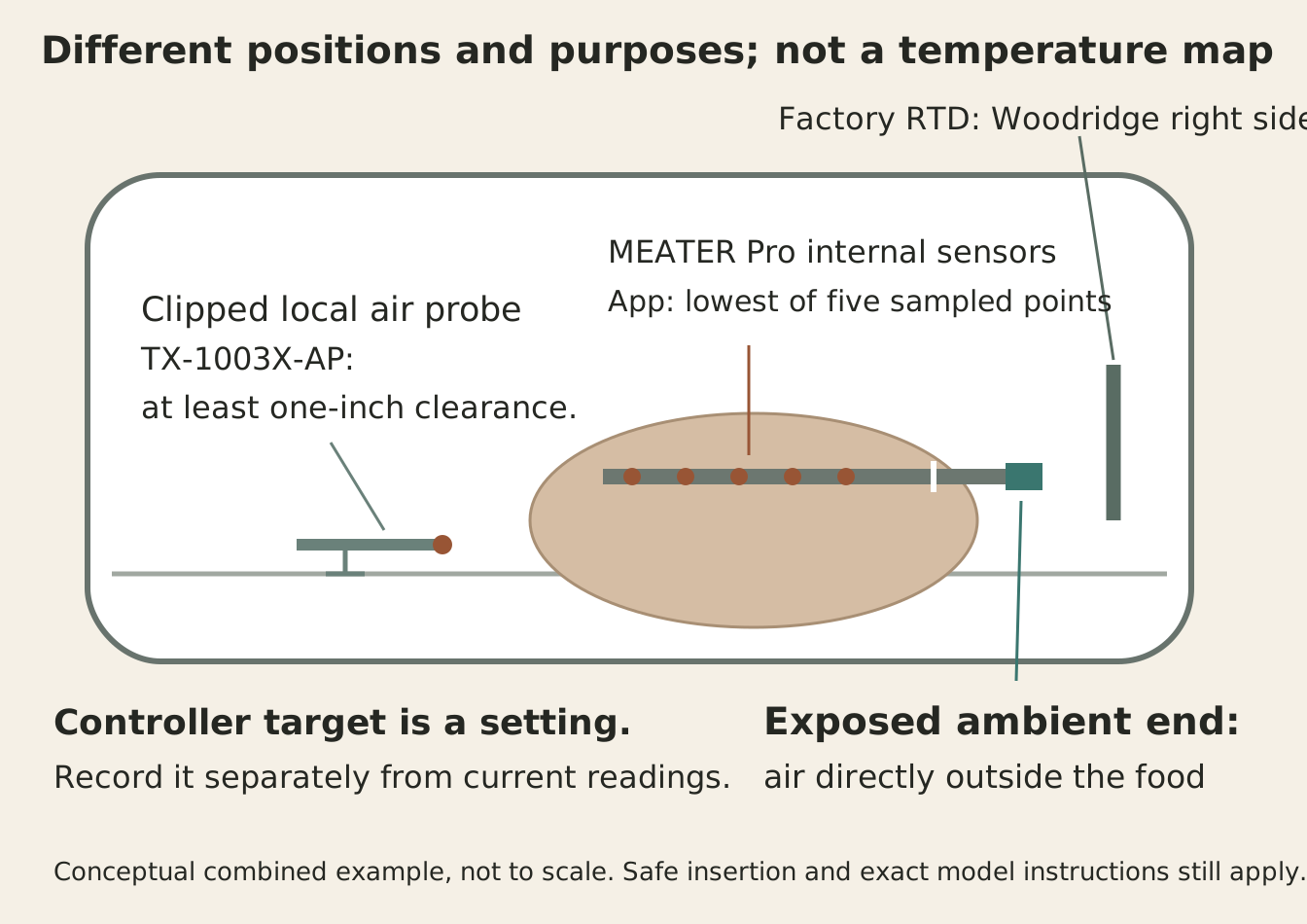
In the Woodridge example, the factory RTD is vertical on the right inside the barrel. The separate TX-1003X-AP uses a grate clip and its instructions keep the tip at least one inch from the cooker wall. MEATER’s square ambient end remains outside the food while the internal sensors belong inside, following its own insertion guidance. [3] [4] [5] [7] [8]
MEATER describes cold food cooling the nearby air, evaporation lowering temperature around the meat, and direct food contact cooling the ambient end. These are explanations to investigate, not offsets to add to the app. The documentation does not tell you the size of any effect in your cook. [5]
The Pro guide’s lowest-of-five summary is the lowest of the probe’s sampled internal points. It does not prove the probe has found the coldest location anywhere in an entire cut. Review insertion and the displayed sensor information before interpreting two internal readings as measurements of the same spot. [6] [7]
A diagnostic path that does not force agreement
On a narrow screen, scroll the table sideways to compare all columns.
| Situation | Distinction to check | Next useful action |
|---|---|---|
| Selected number differs from a current display. [1] | Target versus current indication. | Record both and the heating phase; do not label the target a measurement. |
| Controller differs from clipped air probe. [2] [4] | Processed controller value versus local air at another location. | Identify model and sensor positions before applying either number as an offset. |
| Air-probe tip is near the wall. [8] | Exact probe placement requirement. | Use the TX-1003X-AP instruction if that is your model; do not generalize its distance to all probes. |
| MEATER ambient differs from cooker setpoint. [5] | Near-food air versus target. | Use the ambient value for its documented role; it is not an appliance-setpoint confirmation. |
| Ambient difference changes after food is added. [5] | Nearby cool food and evaporation. | Record the event and location; do not invent a correction factor or require eventual equality. |
| Exposed ambient end touches food. [5] [7] | Sensor contact and insertion. | Follow the exact insertion and safe-handling guidance; keep required insertion rather than pulling the probe into hot air. |
| An instant observation differs from a later one. [5] | Sensor response and manufacturer processing. | Compare readings with their times and operating state; no universal wait period follows from this example. |
| Two internal readings differ. [6] [7] | Different sensing positions or a multi-sensor summary. | Check what each display summarizes and where each sensor sits; compare internal with internal. |
| Controller behaves erratically or sensor is visibly damaged. [9] | Possible model-specific fault, beyond an unlike-sensor comparison. | Use the manufacturer’s RTD troubleshooting or support path; do not change wiring or invent an offset from another probe. |
MEATER describes processing that compensates for the time needed to warm its ambient-end casing. That makes reading time and changing conditions part of the comparison, but supplies no universal settling time for every sensor. Write down whether the lid was opened, food was added or a probe position changed when the readings diverged. [5]
If a concern remains after you have identified purpose, placement and response, use the exact instrument’s supported accuracy-check or service path. An ice-point check and owner-trim decision are separate tasks from comparing chamber locations. Keep unlike readings in their own roles; use the maker’s diagnostic criteria for any settings change.
A record of the comparison you actually made
Start blank. Compare like purposes, preserve required insertion and record times; this worksheet contains no measured cooking data.
These entries are personal notes. They are not sent to a restaurant or submitted to this site.
Sources and method
- Traeger Woodridge US Owner’s Manual, T14815Source checked · traegergrills.a.bigcontent.io
- Traeger Third-Party Thermometers, public article JSONSource checked · support.traeger.com
- Traeger RTD, public article JSONSource checked · support.traeger.com
- ThermoWorks Pro-Series High Temp Air Probe TX-1003X-AP productSource checked · www.thermoworks.com
- MEATER Ambient Temperature Sensor, public article JSONSource checked · support.meater.com
- MEATER Pro Support Guide, public article JSONSource checked · support.meater.com
- MEATER Internal Temperature Sensor, public article JSONSource checked · support.meater.com
- TX-1003X-AP instructions P-14-002-01-c, manufacturer CDNSource checked · cdn.shopify.com
- Traeger Check if an RTD is Working Correctly, public article JSONSource checked · support.traeger.com
How this article is prepared
Researched and drafted with AI assistance from the cited sources. Examples and calculations retain their stated assumptions; illustrations do not establish restaurant visits or equipment tests.
About BBQ Explorer